
LIVE HEART-RATE TRAINING FOR CLUBS
Open a browser, connect the class, and every member’s effort is on the wall: live heart-rate zones, points and a leaderboard, on the screens you already own, with the wearables your members already wear.
No hardware to buy. Nothing to install. Nothing to rip out of your current setup.
7 days free · cancel anytime
NO HARDWARE TO START · ANY WEARABLE · LIVE IN 60 SECONDS · FLAT PRICING
HEART-RATE TRAINING, MINUS THE ENTRY BARRIER
Group heart-rate training is one of the few things proven to keep members coming back, because effort you can see is effort you want to repeat. The problem is that most systems make you buy the equipment before you get to find that out, with proprietary straps, installation days and a bill that grows with every member who joins. SNAP flips the order: you start with the wearables your members already own, and you add hardware if and when it actually serves you.
THE MANDATORY STARTER KIT
Some systems cannot show a single heartbeat until you have purchased, charged and sanitized a full crate of proprietary straps. You end up paying for the equipment before anyone has proven the concept in your room, and your front desk inherits an inventory to manage on top of everything else.
THE BRAND LOCK
Most of your members already wear a device they like and trust. A system that only reads its own hardware is effectively asking them to strap on a second one every time they walk into class, and that is friction nobody signed up for.
THE METER THAT RUNS PER MEMBER
With per-member pricing, the bill grows at exactly the moment your classes start working, so your own success is what gets taxed. The newer versions of the same model simply move the meter: members who would rather not buy the proprietary strap are asked to pay a monthly subscription just to use the watch that is already on their wrist.
A screen that only shows the people who paid extra is only half your class.
None of this means hardware is the enemy. In a large multi-screen room with gamification running live, dedicated radio receivers are what keep every sensor connected reliably across the floor, and for that scenario we build the equipment ourselves: the Uptivo Lightband for members without a wearable, and professional receivers for the full studio setup.
That is the point of a hybrid architecture. Software where software is enough, hardware where the room actually demands it, and the choice stays yours instead of being the price of admission.
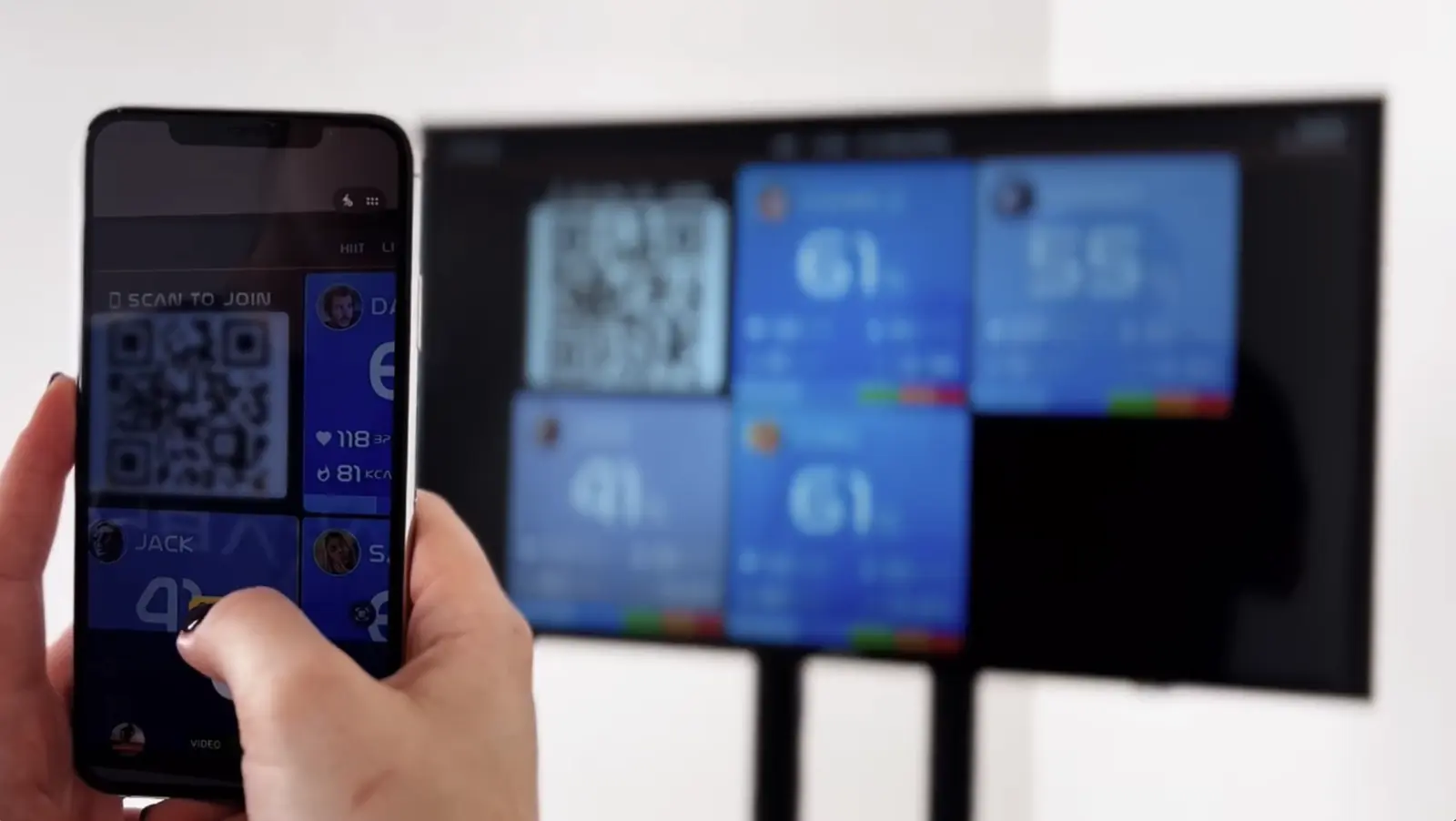
What you see below is not a mockup and not a recording. It is a real SNAP display, the same screen that would hang on your wall, running live inside this page. You can watch the demo athletes train, or you can get on the screen yourself.
PUT YOUR OWN HEART RATE ON THIS SCREEN.
1.
Open this page on the screen where you would run it: the wall TV, the studio display, any browser. Fullscreen if you like.
2.
Download the Uptivo app on your phone.
3.
Tap the scan icon in the app and scan the QR code on the display.
4.
Create your account in the app. Fully self-service, exactly the way your members will do it.
5.
Follow the app, start moving, and watch your own heart rate land on the screen.
6.
Got a colleague nearby? Same steps, same screen. Both of you live, side by side.
You just did member onboarding, end to end, and nobody from our team was involved. That is the setup your front desk never has to explain.
The screen you just used runs on an Uptivo demo club.
The free trial gives you the same screen on your own account: your club, your classes, your members, live on your wall.
Your own SNAP screen, on your own account · 7 days free · cancel anytime
HOW SNAP WORKS
FROM A BROWSER TAB TO A LIVE CLASS IN FOUR STEPS.
SNAP runs in a browser, so there is nothing to install on the screen and nothing to configure on the network. Open it, connect it, and the class is live before the warm-up ends.
01 · OPEN SNAP ON ANY SCREEN
Open snap.uptivo.fit on any TV, tablet or display. A screen code is generated automatically, with no app to install and no cable to run.
About 10 seconds.
02 · CONNECT YOUR ACCOUNT
Enter the screen code in club.uptivo.fit and the display is paired with your club. No drivers, no receivers, no waiting.
About 20 seconds.
03 · CONNECT WEARABLES
Members open the Uptivo app and scan the screen. Garmin, Apple Watch, Polar, Whoop, Myzone, the Uptivo Lightband or any standard Bluetooth strap.
About 20 seconds.
04 · THE LEADERBOARD IS LIVE
Athletes appear in real time, heart-rate zones display instantly, and the class starts.
Time to sweat.
Sixty seconds from browser tab to sweating class.
7 days free · cancel anytime
WHAT THIS MEANS FOR YOUR CLUB
Nothing about the class changes except that everyone can see it. That is enough to change how members train, how coaches coach, and what the club can charge for.
CLASSES PEOPLE TALK ABOUT
Live zones, points and a leaderboard turn an ordinary class into a shared event. People push harder when the room can see it, and they come back to beat last week.
COACHES WITH DATA, NOT GUESSES
Live performance data in front of the coach, so intensity is managed per person, not by shouting at the room.
A PREMIUM EXPERIENCE WITHOUT CAPEX
A connected-fitness experience on the screens and devices that already exist. The investment is a subscription, not a hardware project.
ALREADY RUNNING A HEART-RATE SYSTEM?
Move to SNAP without replacing your workflows, interrupting your classes or forcing members to change devices. Run it alongside what you have today, and retire the old system when the room has voted.
| Criterion | Hardware-first systems | SNAP |
|---|---|---|
| Hardware required to start | Yes | None |
| Device compatibility | Brand-locked | Any device |
| Setup time | Hours to days | Minutes |
| Pricing model | Per-member fee | Flat monthly |
| Class disruption | Common | Zero |
7 days free · cancel anytime
START WITH SNAP. GROW WITH UPTIVO.
SNAP is the entry point to the Uptivo platform. Every layer you add later runs on the same account, the same member app and the same screens.
01 · HEART-RATE TRAINING
Live effort, zones and leaderboards on any screen. Ready in 60 seconds, with the wearables your members already own.
02 · WORKOUTS & PROGRAMMING
1,300+ exercises, structured sessions and synchronized timers on the in-club screens, plus individual plans in the member app.
03 · AI COACHING + NEW REVENUE
Nate writes the programs, premium tiers and remote classes open new revenue, and the platform grows with you beyond the club floor.
Do I need to buy any hardware to run SNAP?
No. SNAP runs in a browser on the screens you already own and reads the wearables your members already wear, so there is nothing to purchase or install to get started. If some of your members train without a device, the Uptivo Lightband is available as an optional add-on, but it is never a requirement.
Does SNAP handle large rooms with multiple screens and gamification?
Yes, and this is exactly where the hybrid architecture comes in. A standard class runs entirely in the browser, with wearables connecting through the Uptivo app on each member’s phone. When you scale up to a multi-screen room with live gamification, dedicated radio receivers keep every sensor connected across the whole floor, and Uptivo supplies that hardware as part of the same platform. You start with software alone, and you add the radio layer only when your room actually calls for it.
Which wearables and straps work with SNAP?
SNAP is wearable-agnostic. Garmin, Apple Watch, Polar, Whoop, Myzone, the Uptivo Lightband and any standard Bluetooth chest or arm strap all connect through the Uptivo app. Whatever your members walk in with is almost certainly supported, and heart rate from every device lands on the same screen in the same way.
How long does it really take to get a class live?
About sixty seconds in practice. You open snap.uptivo.fit on any screen, enter the code in your club account, and members scan the QR code from the Uptivo app as they walk in. There are no drivers, no installations and no technician visits, which is why the first class usually happens the same day you sign up.
What happens to members who do not own a wearable?
They can join with the Uptivo Lightband, a simple armband the club can keep on hand and lend or sell at the front desk. It connects like any other device and puts them on the same screen as everyone else, so nobody sits out of the class just because they showed up without a watch.
How is SNAP priced?
One flat monthly price per club, with no per-member fees and no conditions attached. Your members pay nothing on top of it either: connecting a wearable and appearing on the screen is part of the service, not a personal subscription they have to buy. Twenty people in the class or two hundred, the bill stays the same.
How does the free trial work?
The trial runs for 7 days with full access to SNAP. A credit card is required to start, and you can cancel at any moment during the trial with no charge. If SNAP is not for you, cancel from your account in one click.
Can I switch from my current heart-rate system without disrupting classes?
Yes, and most clubs run the two side by side during the transition. SNAP needs nothing installed and nothing removed, so you can trial it in one studio while the rest of the club keeps running as before, then switch room by room at your own pace. Members keep the devices they already own throughout.
What is the difference between SNAP and hardware-first heart-rate systems?
A hardware-first system asks you to buy the equipment, book the installation and commit to per-member fees before your first class ever runs. SNAP starts from the opposite end: it opens in a browser, reads any wearable your members bring, and charges one flat monthly price that neither you nor your members ever have to top up. And because it runs on the Uptivo platform, the same account grows into programming, AI coaching and full studio setups whenever you are ready.

THE NEXT CLASS COULD BE LIVE
Start the free trial, open a browser on the class screen, and see how members respond when effort is visible.
7 days free · cancel anytime